.png)
%202026.png)
- Mar 26
- 4 min read
Updated: 1 day ago
Welcome to Conveyancing Concierge Australia
Welcome to the Concierge Community.
We're excited to have your office joining the growing community of conveyancers using CCA to collect information earlier, identify potential risks sooner, and provide a smoother client experience from day one.
Before you get started, there are just a few things you need to know.

We encourage all team members to join the CCA Community Facebook Group.
It's where we ask & share:
Proposed features
Product updates
Workflow tips
Industry discussions
Educational resources
Click Here: Concierge Community Facebook Group


Logging Into Your Conveyancer Portal
Once submissions begin arriving, you can access them through your Conveyancer Portal.
To access your portal:
Visit the CCA website
Click Log In
Sign in using your email address and password
Inside your dashboard you can:
• View client submissions
• Download all supporting documents, contracts and uploaded documents
• Access Client Declarations
• Review Risk Profiles and alerts
Your portal is the central location for all CCA submissions and supporting documents.
Tip: We recommend downloading the submission and saving it to your conveyancing file before opening the matter in Setts+ or Realtime Conveyancer.


Sending Your Unique CCA Link to Clients
The good news? There is very little to learn to start seeing the benefits of CCA.
Recommended Workflow
Appointed → Send CCA Link → Receive Submission → Open File
When Appointed
Once appointed, send your office's CCA onboarding link immediately via PDF and SMS.
Ask clients to complete onboarding within 24 to 48 hours, regardless of any outstanding contract conditions.
If Not Completed
After 24 hours: Send an SMS reminder.
After 48 hours: Follow up by phone or email and explain that your office cannot begin preparing for settlement until onboarding is complete.
Once Completed
You will be notified by email as soon as the submission is complete.
Login to your CCA Dashboard and download all client uploads and documents
Open a new file using the CCA submission as your source document
Save all CCA documents to your Setts+ or RTC file for audit readiness
Why This Works
Using the submission as your source document allows your team to:
• Enter information once
• Reduce data entry errors
• Avoid double handling
• Start with a clearer picture of the transaction

Where Is My Unique Office Onboarding Link?
Your office's unique onboarding link can be found inside your Conveyancer Dashboard.
Finding Client PDF Template
Login → Conveyancer Dashboard → My Office Onboarding Link
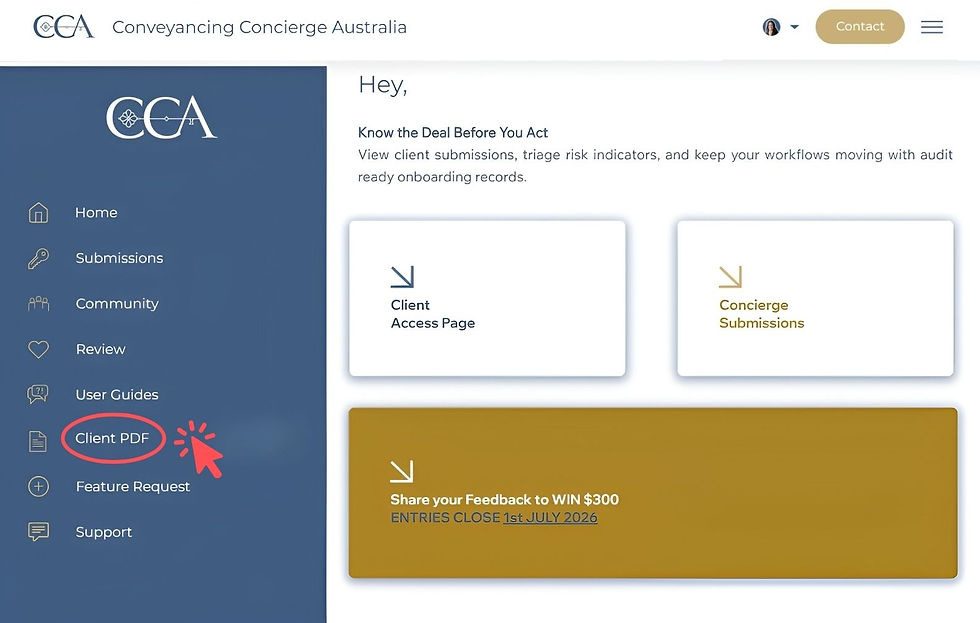
Finding My Unique Office Onboarding Link
Login → Conveyancer Dashboard → My Office Onboarding Link


Suggested Templates
SMS Template
"Thank you for appointing [your company name] to assist with your settlement. Please complete your secure onboarding using the link below within the next 24-48 hours.
Please note you will be asked to upload documents, so please do this from a device that feels comfortable to you. [Insert Your CCA Office Link] If you have any questions, please contact our office on Ph: [Insert Office Number]"
Reminder SMS Template
Just a quick reminder. Please complete your onboarding within 24 hours so we can proceed with your settlement:
[Insert Your CCA Office Link]
Thank you. Ph: [Insert Office Number]"
Email Template
"Thank you for choosing [your company name] to assist with your property settlement.
To help us get started, please complete your secure online onboarding within the next 24 -48 hours. Please review the attached PDF, with instructions on how to get started.
If you have any questions or experience any difficulties, please contact our office.
Kind regards,
[Name]
[Office Name]
Phone: [Phone Number]"


The CCA Client Declaration Matters
The Client Declaration should be sent with your settlement documents for signing.
Why Is It Important?
It Confirms Information Provided on Behalf of Others
To avoid additional submission fees, CCA allows one person to complete onboarding on behalf of a buying or selling side.
For example:
A spouse may complete on behalf of both spouses
A director may complete on behalf of a company
A representative may provide information on behalf of others
The CCA Client Declaration should be signed alongside settlement documents. This provides a second verification point, allowing all parties to review the information submitted during onboarding, and verify that the details remain accurate and unchanged at the point of being identified through your office existing VOI processes.
It Supports Ongoing Due Diligence
Under AUSTRAC expectations, due diligence is not a one time event.
The declaration provides a second confirmation point between initial onboarding and when settlement documents are signed.
By signing, clients are confirming that the information remains accurate and that it is their responsibility to notify the settlement agent in writing if the details were to change.
This helps support your ongoing due diligence obligations throughout the transaction.

Understanding the Risk Profile
Each submission includes a Risk Profile generated from the information provided during onboarding.
Important:
The Risk Profile is a practitioner tool designed to help conveyancers identify matters that may require additional attention, investigation, documentation, advice, or management.
CCA is not an AML software provider and the Risk Profile is not aligned to AUSTRAC's AML/CTF risk framework. Instead, CCA takes a broader view of the transaction, highlighting factors that may create complexity, delay settlement, increase risk, or fall outside the scope of a standard settlement.
The Risk Profile is intended to support informed decision making, including whether to:
• Investigate a matter further
• Escalate the file internally to a senior conveyancer or compliance officer
• Adjust fees to align with the scope of work required
• Decline to act before designated services commence
The Risk Profile is for practitioner use only and should not be provided to clients. Please retain it within your file records.
Cyber Aware
Cyber criminals frequently target property transactions. If a client's email account has been compromised, or communication channels have been intercepted, a fraudulent party may attempt to complete onboarding and provide false contact details.
For this reason, you should always verify the email addresses against the contract before proceeding.

Need Help?
To ensure the fastest response, please always contact CCA Support through the support channels provided in your portal.
Please avoid contacting individual CCA team members directly.
Support requests submitted through official channels can be allocated to the next available team member, allowing us to assist you more efficiently.

We look forward to working with you.
The CCA Team